


Draw Line
Draw line on an image. Connect path data to it to draw line from path.
Node Data | |
|---|---|
 | |
Display name | |
Draw Line | |
Internal name | |
Node_Line | |
Inheritances | |
| Node_Processor | |
| Node_Line | |
Inputs | |
Output | |
vec2 |
Dimension |
bool |
Use Path Bounding Box |
bool |
Combine Array |
ipadding |
Padding |
bool |
Width Pass |
enum |
Width Blend Mode |
Background | |
enum |
Background |
color |
Bg Color |
surface |
Bg Surface |
enum |
Bg Blend Mode |
Line Data | |
enum |
Data Type |
rotation |
Rotation |
path |
Path |
vector |
Segment |
vec2 |
Start Point |
vec2 |
End Point |
bool |
Loop |
bool |
Fix Length |
islider |
Segment |
float |
Segment Length |
Width | |
bool |
1Px Mode |
range |
Width |
bool |
Span Width Over Path |
Weight | |
bool |
Apply Weight |
range |
Normalized Range |
Line Settings | |
range |
Range |
bool |
Invert |
float |
Shift |
bool |
Clamp Range |
Dash Line | |
bool |
Dash |
vec4 |
Dash Line |
float |
Dash Shift |
Wiggle | |
bool |
Use Wiggle |
seed |
Wiggle Seed |
range |
Amplitude |
slider |
Frequency |
islider |
Detail |
float |
Phase |
bool |
Trim Range |
bool |
Trim Curve |
Segment Process | |
bool |
Separate Segments |
range |
Extension |
rotRand |
Random Angle |
Line Caps | |
enum |
Start Cap |
enum |
End Cap |
islider |
Round Segment |
Textured | |
surface |
Start Cap |
surface |
End Cap |
bool |
Rotate Cap |
rotRange |
Angles |
range |
Offset |
Color | |
gradient |
Color Over Length |
gradient |
Random Blend |
bool |
Span Color Over Path |
Weight | |
gradient |
Color Weight |
vec2 |
Color Weight Range |
Texture | |
surface |
Texture |
vec2 |
Texture Position |
rotation |
Texture Rotation |
vec2 |
Texture Scale |
bool |
Scale Texture To Length |
Render | |
enum |
Ssaa |
Outputs | |
surface |
Surface Out |
surface |
Width Pass |
struct |
Line Data |
Attributes | |
| Color Depth | |
| Interpolation | |
| Oversample | |
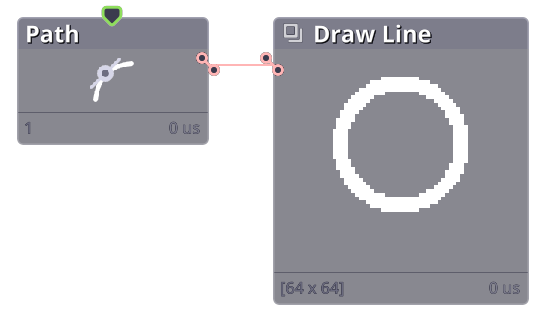
Draw a line to surface.
Properties
| Background | |
| Background | Background type |
| Bg Color | Background color |
| Bg Surface | Background surface |
| Line Data | |
| Data Type | Type of data to draw the line from. |
| Force Loop | Add extra line between the last point to the first. |
| Fix Length | Whether to draw fixed amount of segments (off), or fix the length of each segment (on) to keep path resolution no matter the length. |
| Width | |
| 1Px Mode | Draw a pixel perfect 1px width line. |
| Width | Width of the line. Randomized per segment. |
| Span Width Over Path | Scale width curve (if used) to the current Range value. |
| Weight | |
| Apply Weight | Apply path weight to line width. |
| Line Settings | |
| Range | Trim line relative to input length. |
| Invert | Reverse path direction. |
| Shift | Shift position on the original data. |
| Clamp Range | Clamp range after shift to between [0,1]. |
| Dash Line | |
| Dash | Draw dashed line. |
| Dash Line | Length of dash vs. spacing. |
| Dash Shift | Shift dash position. |
| Wiggle | |
| Use Wiggle | Randomly shift each segment. |
| Amplitude | Amount of shifting. |
| Frequency | Wiggle frequency. |
| Detail | Level of wiggle detail. |
| Phase | Shift wiggling wlong the line. |
| Trim Range | Scale wiggle curve (if used) to the current Range value. |
| Line Caps | |
| Start Cap | Shape of start cap. |
| End Cap | Shape of end cap. |
| Color | |
| Color Over Length | Line color over length. |
| Random Blend | Base color. Random per line. |
| Span Color Over Path | Scale Color Over Length to the current Range value. |
| Color Weight | Color line based on weight. |
| Texture | |
| Texture | Add texture to line. |
| Render | |
| Ssaa | Draw line on larger surface then scaled down for anti-aliasing. |
Commit History
| 1.22.10.202 |
|
|---|---|
| 1.21.8.005 |
|
| 1.21.7.103 |
|
| 1.21.4.002 |
|
| 1.21.4 |
|
| 1.21.3.007 |
|
| 1.21.2.008 |
|
| 1.21.2.001 |
|
| 1.21.10.101 |
|
| 1.21.1.006 |
|
| 1.21.1.005 |
|
Related Links
- Base Code: /scripts/node_line/node_line.gml